
Scheduling Callbacks & Filtering Pending Requests
Step-by-step visual guide to navigating the Callbacks Queue, searching and filtering pending phone requests, scheduling new callbacks with customer details, and updating request statuses.
Overview
🖼️Visual Interface Guide
Step-by-Step Instructions
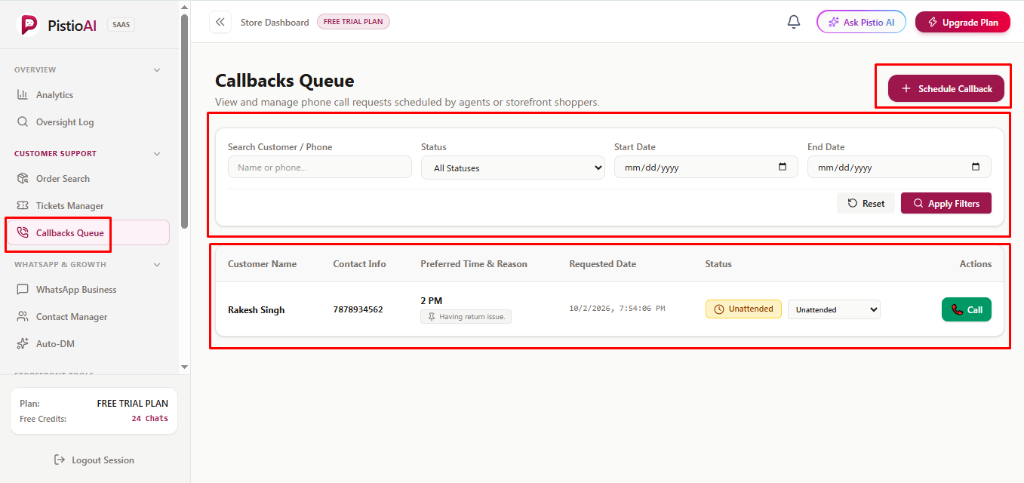
1Accessing Callbacks Queue & Search Filters (Image 1)
Navigate to [Callbacks Queue] in the left sidebar under 'CUSTOMER SUPPORT'. Use the filter bar to locate requests: type names or phone numbers in [Search Customer / Phone], pick a stage from [Status] (All Statuses, Unattended, Attended, Call Not Connected), specify [Start Date] and [End Date] calendar ranges, and click [Apply Filters] (or [Reset] to clear). The ledger displays Customer Name (e.g. Rakesh Singh), Contact Info (e.g. 7878934562), Preferred Time & Reason badge (e.g. '2 PM' with 'Having return issue.'), Requested Date timestamp, Status badge & dropdown, and instant [📞 Call] button.
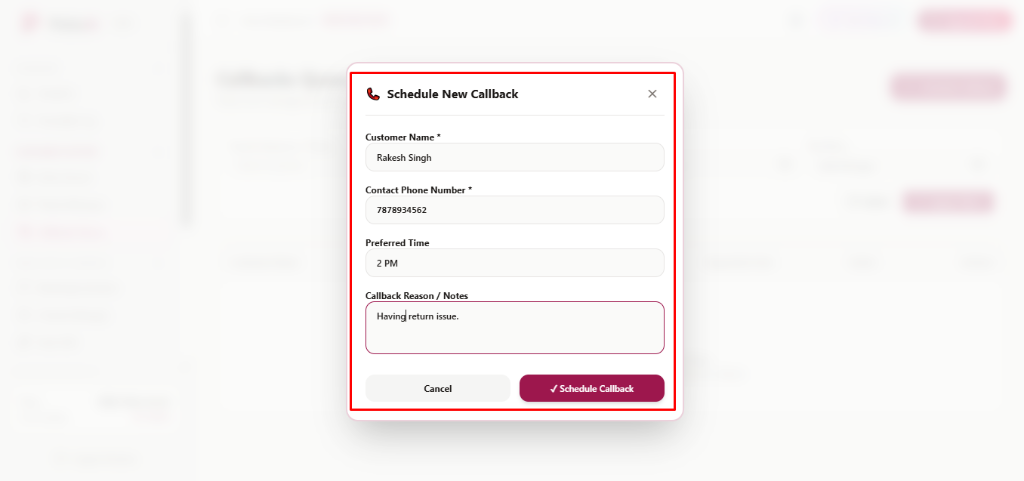
2Scheduling a New Callback Request (Image 2)
Click the top-right berry button [+ Schedule Callback] to open the booking modal. Fill in [Customer Name *] (caller's full name), [Contact Phone Number *] (reachable phone digits), [Preferred Time] (customer's preferred time slot, e.g. '2 PM'), and [Callback Reason / Notes] (context on what the customer needs help with, e.g. 'Having return issue.'). Click [✓ Schedule Callback] to instantly add the request to the active queue, or [Cancel] to dismiss.
3Updating Callback Status & Dispatching Outbound Calls
When an agent picks up a callback, use the inline status dropdown in the table to toggle between [Unattended], [Attended], or [Call Not Connected]. Click the green [📞 Call] action button to immediately place an outbound call through your browser phone system.
💡Pro Tips & Best Practices
- •Always include brief context in 'Callback Reason / Notes' so fellow agents know the customer's issue before placing the call.
- •Once a call is completed, immediately switch the status from 'Unattended' to 'Attended' so other team members know it has been resolved.