
WhatsApp Business Hub, Broadcast Campaigns & Meta Automation Rules
Comprehensive step-by-step visual guide to navigating the WhatsApp Business Hub, launching marketing broadcasts with live smartphone preview, setting up transactional e-commerce trigger rules, and generating Meta templates using AI.
Overview
🖼️Visual Interface Guide
Step-by-Step Instructions
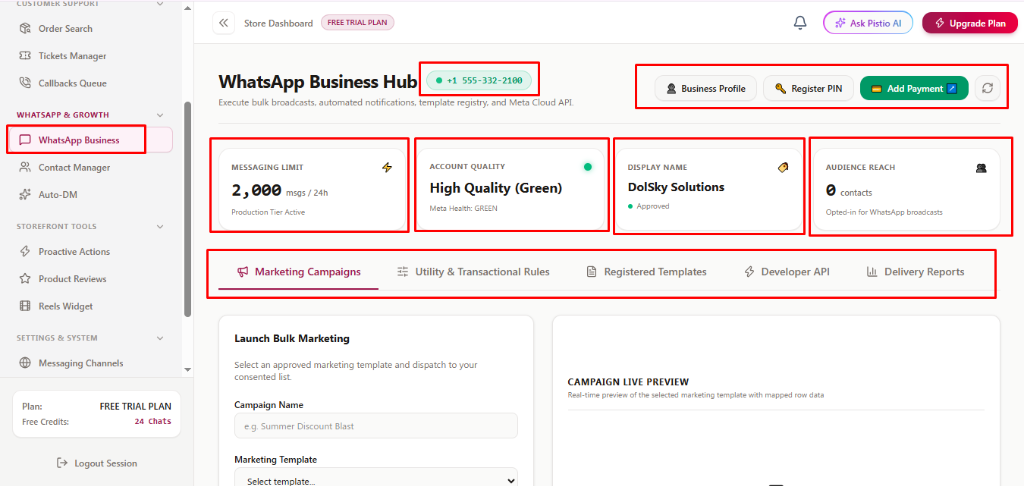
1WhatsApp Business Hub, Account Health & Profile Settings (Image 1)
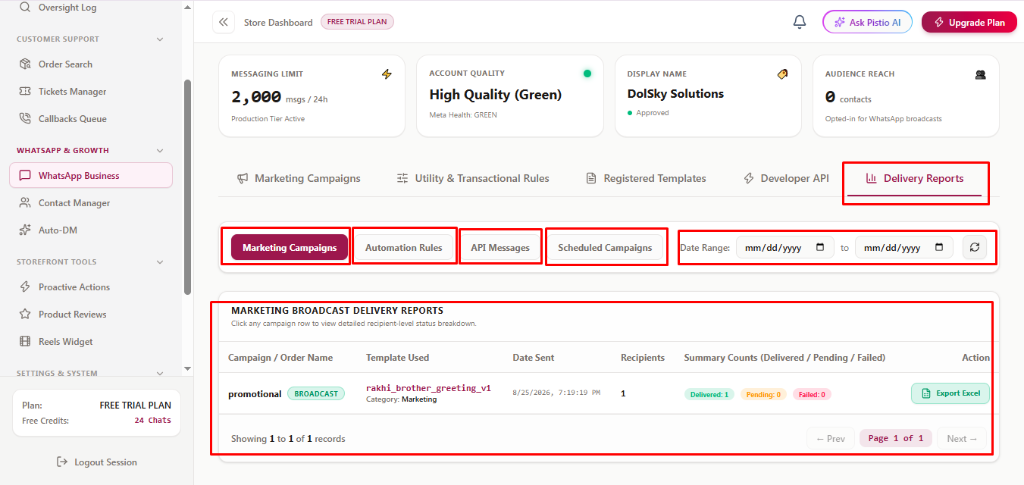
Access [WhatsApp Business] under 'WHATSAPP & GROWTH' in the left menu. The header displays your registered Meta phone number badge (e.g. ● +1 555-332-2100) and top actions: [Business Profile] (edit display name, address, bio), [Register PIN] (two-factor authentication PIN for WABA), [Add Payment ↗] (connect credit card or Meta billing for WhatsApp conversations), and [Refresh Sync]. Below, inspect 4 vital health KPI cards: [MESSAGING LIMIT] (current tier, e.g. 2,000 msgs / 24h), [ACCOUNT QUALITY] (Meta status, e.g. High Quality (Green)), [DISPLAY NAME] (e.g. DolSky Solutions - Approved), and [AUDIENCE REACH] (total opted-in subscribers). Switch between 5 tabs: [Marketing Campaigns], [Utility & Transactional Rules], [Registered Templates], [Developer API], and [Delivery Reports].
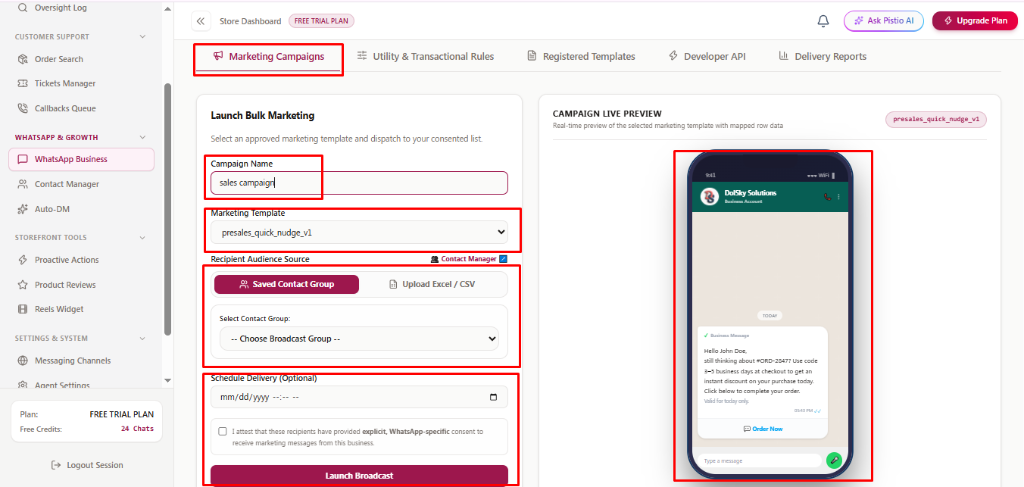
2Launching Marketing Campaigns & Live Phone Preview (Image 2)
Under the [Marketing Campaigns] tab, name your campaign in [Campaign Name] (e.g., 'sales campaign') and select an approved template from [Marketing Template] (e.g., 'presales_quick_nudge_v1'). Under 'Recipient Audience Source', choose [Saved Contact Group] (select from your groups or click [Contact Manager ↗]) or switch to [Upload Excel / CSV]. Optionally schedule delivery in [Schedule Delivery (Optional)], check the mandatory WhatsApp opt-in consent box ('I attest that these recipients have provided explicit, WhatsApp-specific consent...'), and click [Launch Broadcast]. The right-hand smartphone simulator displays a real-time pixel-perfect preview of your message, dynamic variables, discount codes, and quick-action buttons.
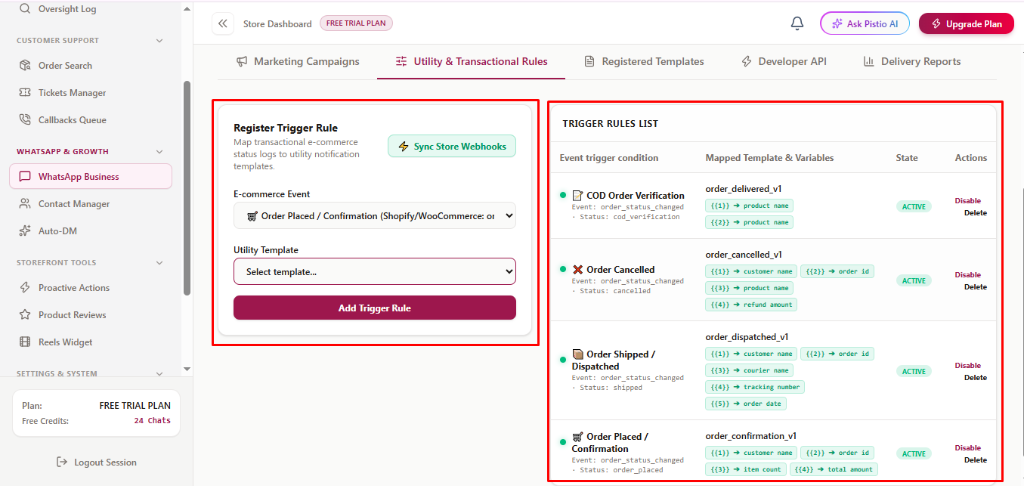
3Configuring E-Commerce Utility & Transactional Rules (Image 3)
Under [Utility & Transactional Rules], automate customer WhatsApp notifications based on store order events. Click [⚡ Sync Store Webhooks] to connect real-time store events from Shopify or WooCommerce. In 'Register Trigger Rule', pick an [E-commerce Event] (e.g., Order Placed, Order Shipped, Order Cancelled, COD Verification), select the matching [Utility Template], and click [Add Trigger Rule]. The 'TRIGGER RULES LIST' table shows active rules, variable mappings (e.g., {{1}} → customer name, {{2}} → order id, {{3}} → courier name, {{4}} → tracking number), current state (ACTIVE), and quick actions to [Disable] or [Delete] rules.
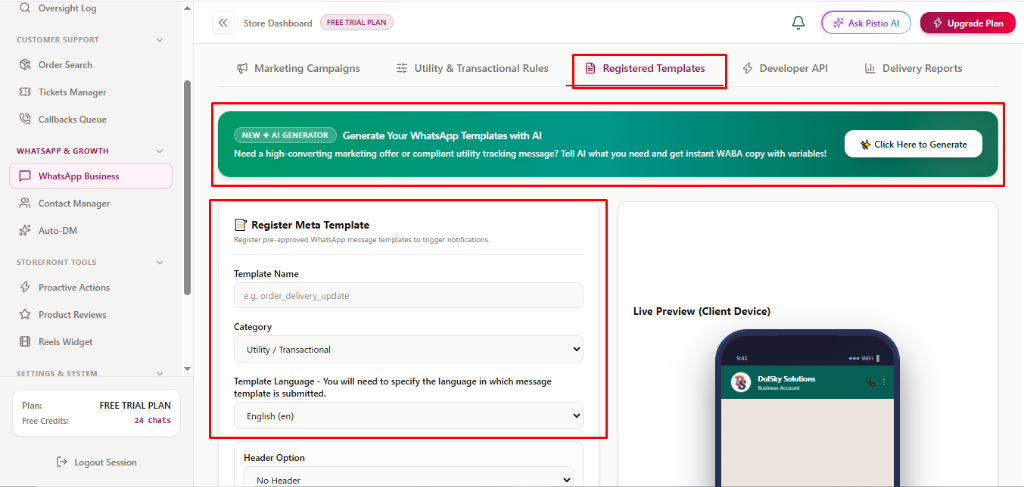
4AI Template Generator & Registering Meta Templates (Image 4)
Under [Registered Templates], click the green AI generator banner action [✨ Click Here to Generate] to have PistioAI write high-converting, compliant WhatsApp templates automatically. In the 'Register Meta Template' form below, specify: [Template Name] in lowercase underscore format (e.g., order_delivery_update), choose [Category] ([Utility / Transactional], Marketing, or Authentication), and select [Template Language] (e.g., English (en)).
5Composing Template Variables, Header, Footer & Device Preview (Image 5)
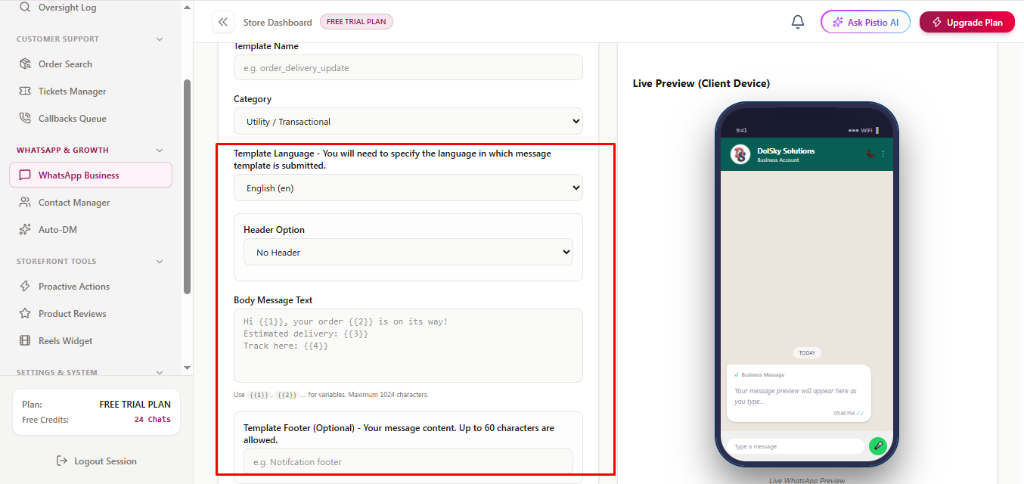
Continue configuring your Meta template: choose a [Header Option] ([No Header], Text, Image, Video, Document). In [Body Message Text], type your copy using curly brace variables like {{1}}, {{2}}, {{3}} for customer name, order ID, delivery date, or tracking URL (up to 1024 characters). Optionally enter a [Template Footer (Optional)] (up to 60 characters). As you type, the right-side Live Preview on the client smartphone device dynamically shows how the message will look to your shoppers.
6Developer API Access Key & State Management (Image 6)
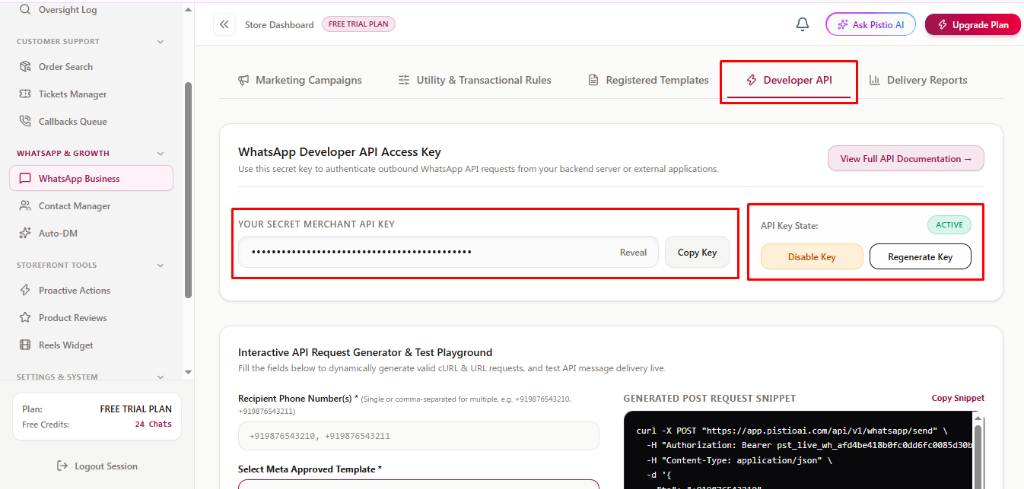
Under the [⚡ Developer API] tab, merchants and developers can manage credentials for external backend integrations. The 'YOUR SECRET MERCHANT API KEY' field conceals your live production token. Click [Reveal] to unmask the key or [Copy Key] to copy it to your clipboard. The right-side panel displays the [API Key State:] badge ([ACTIVE]), alongside [Disable Key] to temporarily block outgoing API calls and [Regenerate Key] to immediately roll and issue a new secure key if compromised.
7Interactive API Request Generator & Live Test Playground (Image 7)
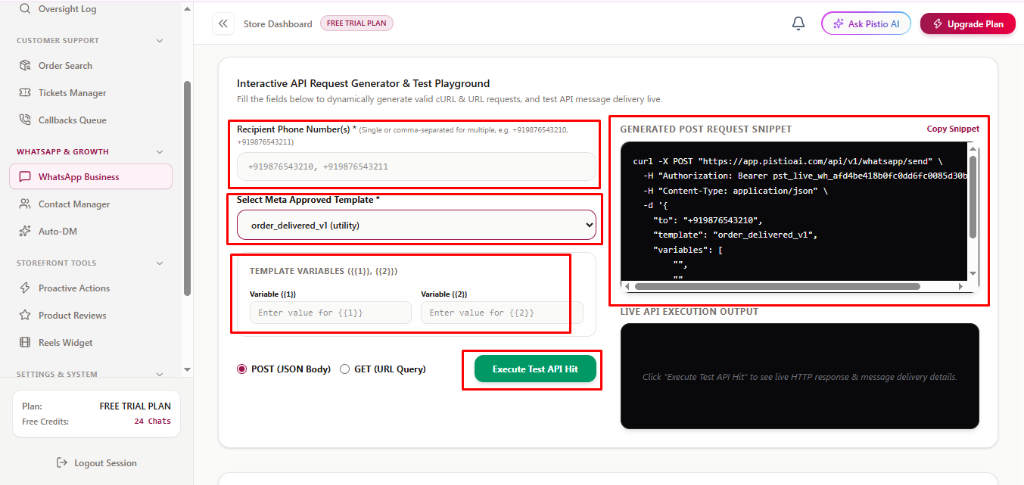
Scroll down the [Developer API] tab to the 'Interactive API Request Generator & Test Playground'. Enter phone numbers in [Recipient Phone Number(s) *] (supports comma-separated numbers like +919876543210), choose an approved template from [Select Meta Approved Template *] (e.g., order_delivered_v1), and fill in test values under [TEMPLATE VARIABLES ({{1}}, {{2}})]. The system generates an executable cURL request in 'GENERATED POST REQUEST SNIPPET' with a one-click [Copy Snippet] button. Select [POST (JSON Body)] or [GET (URL Query)], and click the green [Execute Test API Hit] button to fire a live test message and verify the payload in 'LIVE API EXECUTION OUTPUT'.
8Delivery Reports, Campaign Filtering & Excel Export (Image 8)
Switch to the [📊 Delivery Reports] tab to track message status logs across your business. Use filter pills to view [Marketing Campaigns], [Automation Rules], [API Messages], or [Scheduled Campaigns]. Select calendar dates in [Date Range:] (mm/dd/yyyy to mm/dd/yyyy) and hit refresh. The 'MARKETING BROADCAST DELIVERY REPORTS' ledger details Campaign Name with badges (e.g. promotional [BROADCAST]), [Template Used], [Date Sent], total [Recipients], and [Summary Counts] (Delivered, Pending, Failed). Click any campaign row for recipient-level logs, or click [Export Excel] to download complete spreadsheet reports.
💡Pro Tips & Best Practices
- •Always maintain 'High Quality (Green)' on your Meta WABA account by sending broadcast messages only to customers who opted in.
- •Use curly brackets like {{1}}, {{2}} for dynamic store variables so each customer receives personalized order details automatically.
- •Use the Interactive API Playground with a test mobile number before deploying webhook integrations into production.