
Store Owner Oversight Log Auditing & Filters
Audit team activities, monitor conversation summaries, inspect shopper-to-agent interactions, and analyze workload volumetrics.
Overview
🖼️Visual Interface Guide
Step-by-Step Instructions
1Oversight Log Sidebar Navigation
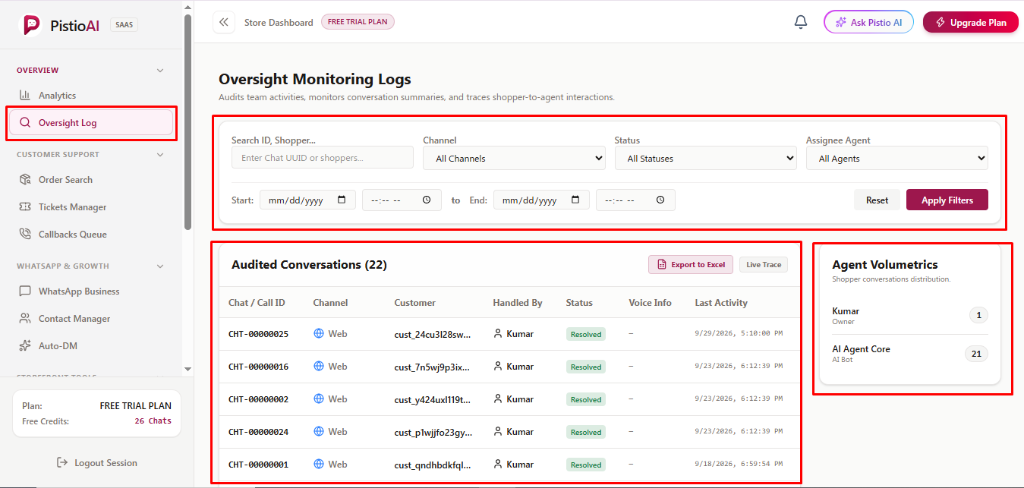
Under the 'OVERVIEW' section in your left sidebar menu, click [Oversight Log] to open the monitoring dashboard. This view is restricted to Store Owners to protect data privacy and team oversight.
2Multi-Criteria Audit Search & Filter Bar
Use the top filter bar to locate specific customer interactions. Enter Chat UUIDs or shopper identifiers in [Search ID, Shopper...], filter by [Channel] (Web, WhatsApp, Instagram, Messenger), [Status] (AI Active, Operator Claimed, Escalated, Resolved), or [Assignee Agent]. Set precise Start and End Date & Time windows, then click [Apply Filters] (in signature maroon) or [Reset] to clear.
3Audited Conversations Log Table
The central table logs all customer conversations with details: 'Chat / Call ID' (e.g. CHT-00000025), 'Channel' badge (e.g. Web), 'Customer' ID, 'Handled By' (Kumar, AI Agent Core), 'Status' (Resolved), 'Voice Info' (call recording status), and 'Last Activity' timestamp. Click any row to open full transcripts. Use [Export to Excel] to download reports or [Live Trace] for real-time monitoring.
4Agent Volumetrics Distribution Card
The right-hand card tracks workload distribution across your support roster. It displays the exact number of conversations handled by human agents (e.g. Kumar - Owner: 1) versus automated AI bot deflection (e.g. AI Agent Core: 21), giving you instant insight into team productivity.
💡Pro Tips & Best Practices
- •Use the exact Chat ID (e.g. CHT-00000025) in the search bar when investigating a customer escalation or dispute.
- •Export the audit log to Excel at regular intervals to maintain offline compliance and QA review records.