
Searching Customer Orders by Email, Phone, or Order ID
Step-by-step visual guide to searching store orders by Customer Email, Phone, or Order ID, selecting orders from history, and inspecting full item breakdowns.
Overview
🖼️Visual Interface Guide
Step-by-Step Instructions
1Order Search Sidebar Navigation
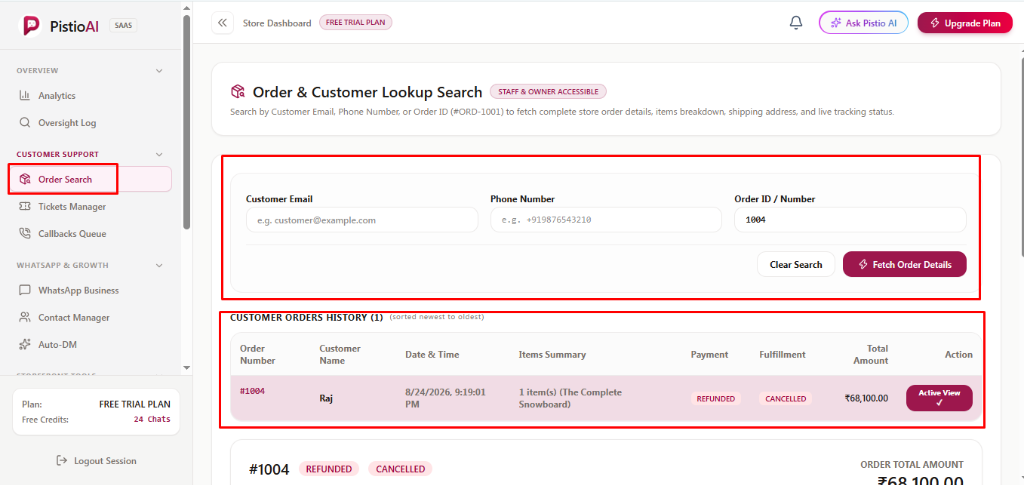
Under the 'CUSTOMER SUPPORT' group in the left sidebar menu, click [Order Search]. Both Support Staff and Store Owners have full access to this lookup module.
2Multi-Input Order Query Panel
Enter any known customer detail: [Customer Email] (e.g. customer@example.com), [Phone Number] (e.g. +919876543210), or [Order ID / Number] (e.g. 1004). Click [⚡ Fetch Order Details] (in signature maroon) to retrieve matching store records, or click [Clear Search] to reset fields.
3Customer Orders History Table
When records are found, the 'CUSTOMER ORDERS HISTORY' table lists all past orders sorted from newest to oldest. Review Order Number (#1004), Customer Name (Raj), Date & Time, Items Summary, Payment status (REFUNDED), Fulfillment status (CANCELLED), and Total Amount (₹68,100.00). Click [Active View ✓] on any row to load its complete details below.
4Order Header, Customer Info & Shipping Destination Cards
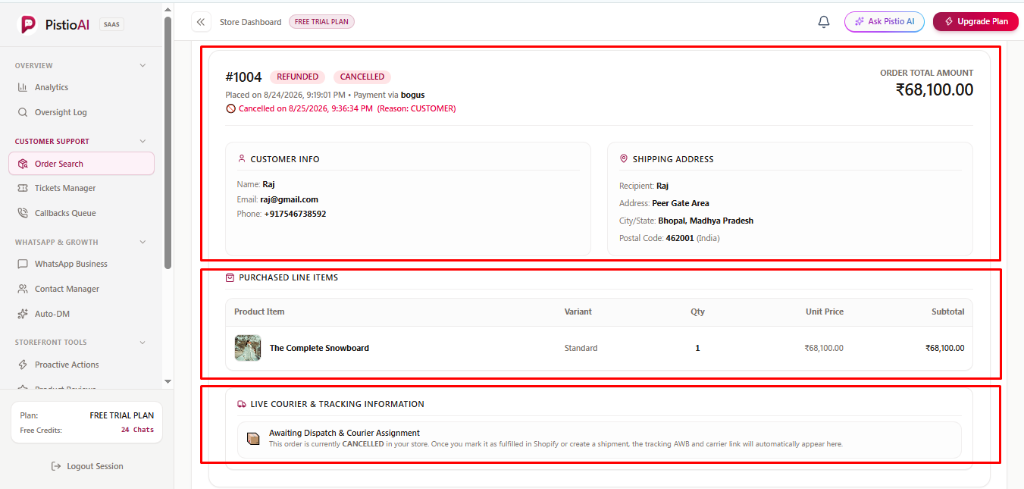
Inspect financial metadata including total order amount, payment gateway (e.g. bogus), and cancellation timestamp & reason (Reason: CUSTOMER). Review verified contact details in [CUSTOMER INFO] (Name, Email, Phone) and delivery coordinates in [SHIPPING ADDRESS] (Recipient, Street, City/State, Postal Code).
5Purchased Line Items Breakdown
The [PURCHASED LINE ITEMS] card itemizes every product in the order. Verify product thumbnail, Product Item title (The Complete Snowboard), variant selected (Standard), purchased quantity (Qty: 1), unit price, and subtotal.
6Live Courier & Tracking Information Panel
The bottom card tracks real-time courier dispatch status. If the order is cancelled or awaiting fulfillment, dynamic guidance is displayed ('Awaiting Dispatch & Courier Assignment'). Once fulfilled in your store, courier name, tracking AWB number, and live tracking links appear automatically.
💡Pro Tips & Best Practices
- •You only need to enter ONE field (either Email, Phone, or Order ID) to fetch orders—filling all three is not required.
- •Click [Active View ✓] in the Orders History table to quickly switch between multiple orders placed by the same customer.