
Initiating Direct Outbound Calls from Callback Table
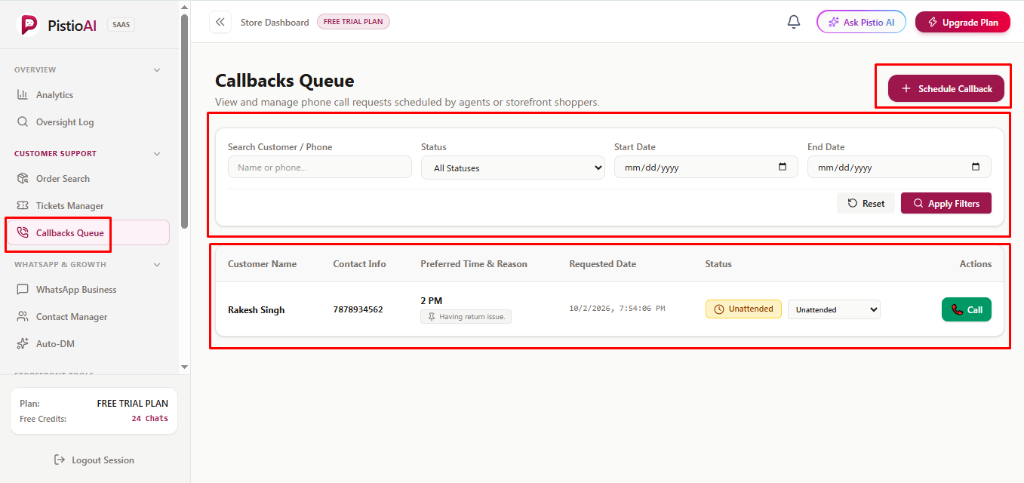
Step-by-step visual guide to reviewing pending callback records, launching one-click browser phone calls, and updating resolution statuses.
Overview
🖼️Visual Interface Guide
Step-by-Step Instructions
1Locate Pending Record & Review Reason
Find the customer's entry in the Callbacks Queue table. Check [Preferred Time & Reason] to see when they wish to be contacted and read their issue summary (e.g., 'Having return issue.') to prepare necessary order context.
2Trigger Outbound Browser Call
Click the green telephone button [📞 Call] in the Actions column. The web dialer triggers the outbound phone line to immediately connect you to the shopper's contact number.
3Mark Call Outcome & Update Status
After ending the phone conversation, click the inline status dropdown in the row and select the appropriate resolution state: [Attended] if the customer was successfully assisted, or [Call Not Connected] if the customer did not answer, keeping the queue clean and accurate.
💡Pro Tips & Best Practices
- •If a customer's call is not answered, set the status to 'Call Not Connected' and make a second attempt during business hours.
- •Verify your browser microphone permissions if the call dialer prompt does not connect immediately.