
Real-Time Order Lookup & Fulfillment Tracking3 min read
Inspecting Customer Info, Line Items & Live Courier Tracking
Review customer shipping addresses, purchased products, and live AWB tracking timelines.
Overview
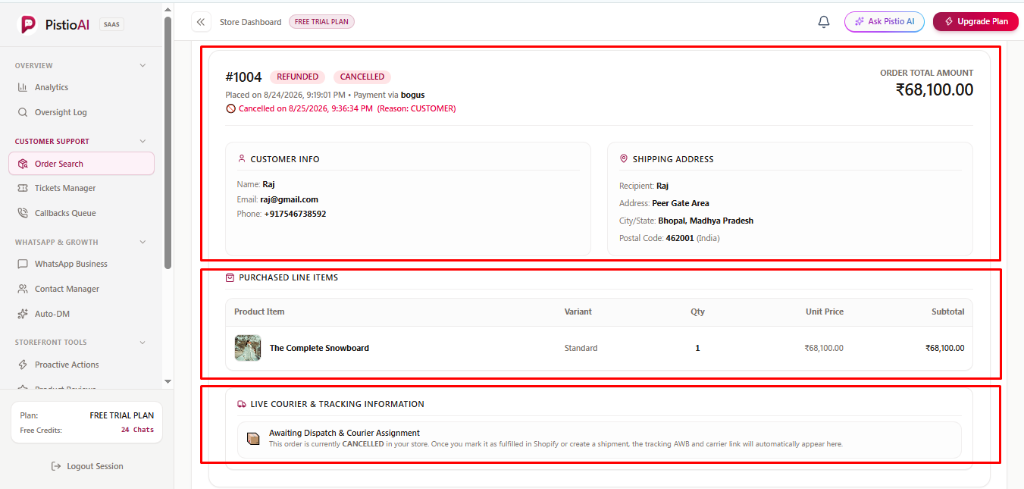
Once order details are fetched, four structured cards present complete order fulfillment context.
📍Exact Buttons / Menus in Dashboard
Customer InfoShipping AddressPurchased Line ItemsLive Courier & Tracking Information
🖼️Visual Interface Guide
Step-by-Step Instructions
1Customer & Shipping Destination Cards
Verify customer name, contact information, payment status, and delivery address in the [Customer Info] and [Shipping Address] cards.
🎯Exact Result Cards: [Customer Info], [Shipping Address]
2Purchased Items & Courier Tracking
Check product names, quantities, and prices in [Purchased Line Items]. Review courier carrier name, AWB tracking ID, and live delivery timeline in [Live Courier & Tracking Information].
🎯Exact Result Cards: [Purchased Line Items], [Live Courier & Tracking Information]
Was this guide helpful?